
Back to: Hiring Course
Job Description, Application, and Redirect Page Instructions
It’s helpful to have the full Job Description and the Application on your website so you can have full control over the entire application process. Indeed will change their processes from time to time, and you don’t want to be forced into changing your hiring process based on what Indeed allows you to do (or allows you to do for free).
You will see that the job ad is rather short, while the job description is very long and detailed. Many business owners have trouble finding candidates who are a good fit for pet sitting and dog walking because there are so many details about the job most people don’t know until they start. So, it’s recommended to be as up front as possible about the job, while still enticing candidates to apply.
The example job description and application shown in the next lesson was made with WordPress and the web page builder Elementor. However, you will be able to build a similar application with any website builder such as:
- Squarespace
- Wix
- Weebly
- Etc.
Google Forms is also a very good option for making custom webforms if you are not able to make one with your website builder.
When an applicant submits the webform, it will generate an email with their information. It’s a good idea to direct these emails to a separate inbox used only to collect applicants. Such as:
You are likely to get 50-100 applicants for every help wanted ad you post. If your applicants are mixed in with your sales and work inbox, it’s easy to lose track of good candidates.

Zendesk
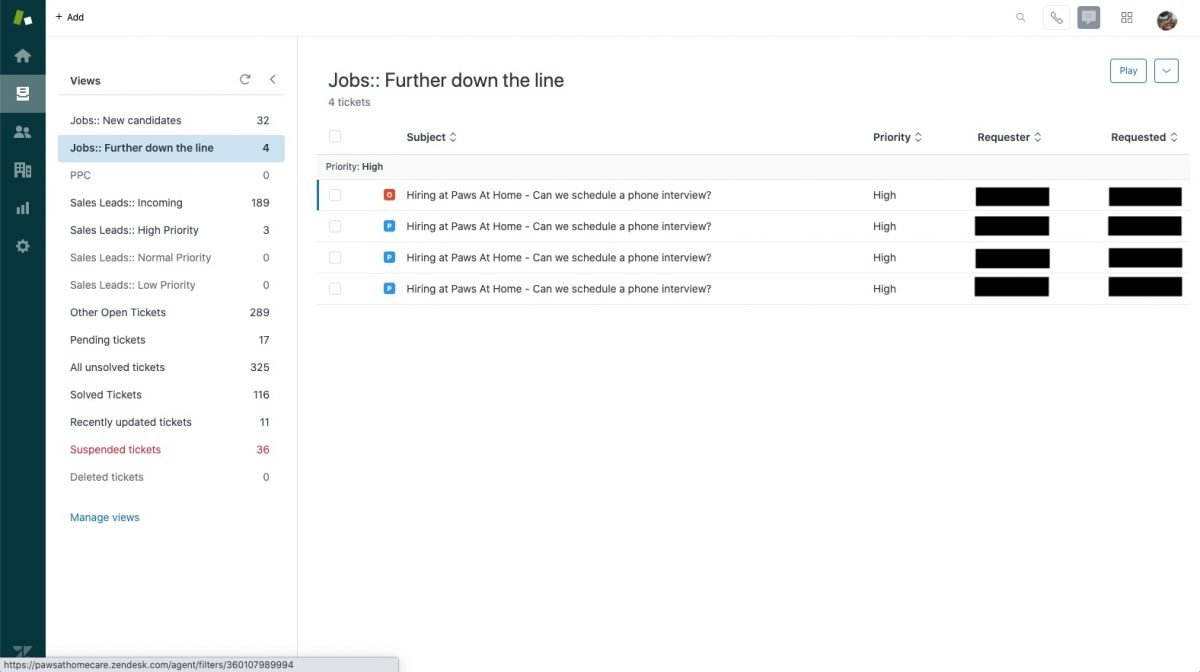
If you receive an overwhelming number of candidates, you may want to consider using Zendesk to organize your applicants.
Zendesk allows you to reply back to multiple applicants at one time with a templated email. It is also a ticketing system, so you can:
- Keep emails “open” while you are working one them
- “Close” a ticket when you decide to either hire or reject a candidate
- Mark the ticket is “pending” while they are still in the hiring process
Additionally, Zendesk is a Customer Relationship Management system (CRM), so you can keep track of folks who have applied before and take notes about each person who contacts you.
We used Zendesk for service in our business and it made it easy to hand off the hiring process to an office manager. We also used the same system to organize our sales emails.
If you decide to use Zendesk, keep in mind, it does take tech skills to set up. If you want to use Zendesk in your business, I suggest you plan on hiring a Zendesk Admin from Upwork for at least an hour or two to get everything setup correctly. They are expensive. Expect to pay $100+ per hour for their service.
Setup a free trial of Zendesk here.
The Redirect Page
It’s also a good idea to have the webform redirect candidates to a new page after they complete the application. This redirect page should include:
- A few notes about what the applicant should expect from your hiring process
- How they can follow up about their application
- Some information about your company
- Testimonials
- Cute pictures of the pets you take care of!
Continue on to the next lessons to see the example:
- Job Description and Application
- Redirect page
Please Note: An editable version of job description is available in your downloadable document pack.